|
|
|
|
|
The download link has been removed, because the target site may harm your computer. |
|
| |
|
|
Video tutorial for CaptureSaver 4.0
This video tutorial has been acquired from Downloadtube.com
|
McAfee SiteAdvisor warning
This software is probably infected with viruses. Visiting the developer's website may cause damage to your computer. Click here
to see McAfee SiteAdvisor report.
|
Review
This is official description
CaptureSaver lets you capture, organize, and search the information you gather on the Internet. When you use CaptureSaver you'll never lose important information, or have to worry about Web sites or pages disappearing never to be found again. aptureSaver works with: Internet Explorer, Firefox, Google Chrome, CaptureSaver can save you valuable time and frustration. If you are someone who spends any time at all finding information on the web and would like to keep what you find and share your results with others either in a file or full presentation venue then CaptureSaver is for you.
The following review written by one of the Software Informer contributors applies to version 4.0
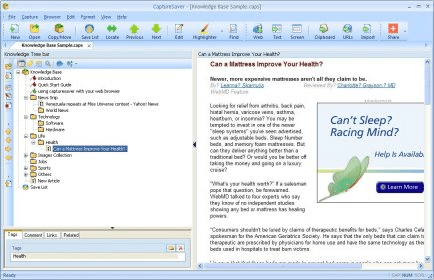
CaptureSaver is a screen-capture tool for Windows computers. Your regular screen-capture application will allow you to do a couple of things: capture your entire screen or capture any combination of active or inactive windows. CaptureSaver does that but also adds support for smart screen-captures from third-party applications. The main example of that is its ability to save a website from Internet Explorer. Or to download any images or text from any website. The application integrates with IE to do that, and it also adds shell extensions so you can use it with other programs. CaptureSaver's graphical user interface is simple. There are two panes, the left one contains a tree list of all your captures, all included into a knowledge base (data base). If you save a website, clicking on its title on the list will display it on the right pane. There, you can browse through it as if it were an actual web browser. However, links will most likely be dead. You can then export anything you save to regular image formats. There is even a scheduler that can tackle capturing processes at given times. |
- Offline browser.
- Many capture options.
|
- The two-pane design isn't the best for browsing full-screen size captures.
|
|
Reviewed by: José Fernández Reviewer rating: Reviewed: 2 years ago
|
|
Report a wrong version
Report a wrong program title
Suggest a correction
|
Screenshots
All 8 screenshots |